Full video control
with 3D references.
Direct AI video like a real shoot: film yourself, animate a simple 3D placeholder in After Effects, and let Seedance 2.5 turn it into any product or object you want. You control the exact movement, the AI does the rest.
Runway · 25% off any plan
Step by step.
01Film your shot
FootageFilm yourself or your scene like a normal shoot. A phone is enough. Act as if the object is already there: look at it, react to it, leave space for it in the frame.
02Animate a placeholder in After Effects
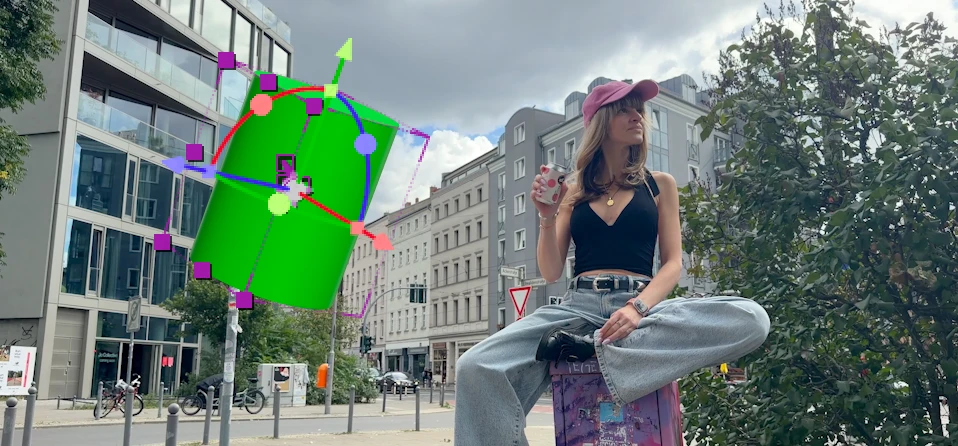
3D PlaceholderBring your footage into After Effects and add a simple 3D object as a placeholder, a basic cylinder or cube is perfect. Animate it with exactly the movement, position, scale and timing your final object should have, and render out the shot with the placeholder in it.

Pro TipGive the placeholder a bright color that appears nowhere else in your shot (like green), so the AI clearly understands which object to replace. It does not need to look good, it only needs to move right.
03Feed Seedance your references
Video GenerationOpen Runway Video Generation and choose Seedance 2.5. Upload your placeholder video as a video reference, plus an image of the object it should become. Multiple views of the object (front, back, top) help a lot with consistency.
Then describe the swap in your prompt:
Video 1 is the reference video. Replace the green 3D object in the video with the product shown in image 1, keeping the exact same movement, position, scale and timing as the 3D object. The product looks exactly like in image 1, with realistic lighting and reflections matching the scene. Static camera, fixed camera angle.Not on Seedance? Google Omni works for this too. It only generates up to 10 seconds per clip, so simply split your reference video into shorter parts and generate them one after another.
04Generate, pick, polish
Generate & RefineGenerate a few takes, the results still vary. The object will follow your animated movement exactly, that is the whole point: you directed the shot, the AI only did the rendering.
Pro TipThis works for any object: products, characters, props. Perfect for ads where the product movement has to be exact, because you keep full creative control over the choreography.
Join the
Newsletter.
Get new AI tutorials, workflows and tool tips first, plus the free Image to Prompt Analyzer and the Top Creative AI Tools list.